
 (855) 573-1435
What Is Mesh WiFi Technology and Which Providers Offer It?
Discover top internet providers with the latest Mesh WiFi technology for seamless in-home connectivity .

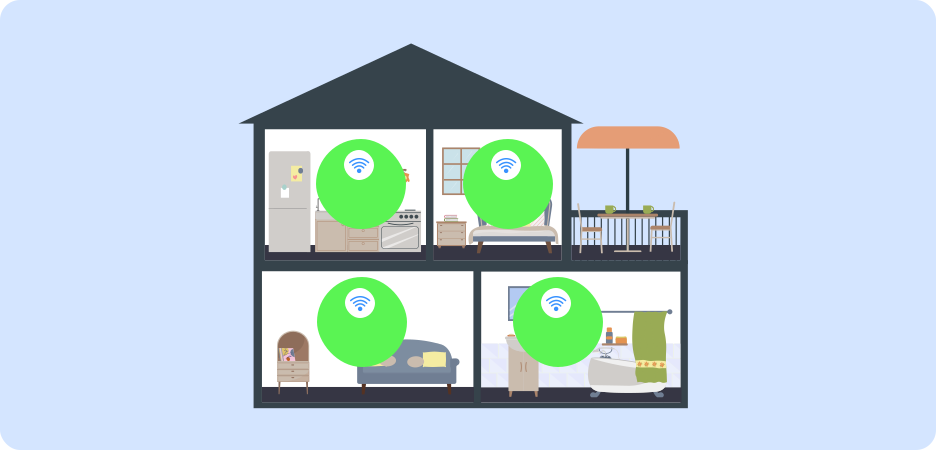
Mesh WiFi utilizes multiple mesh nodes/satellites that collaborate to deliver a consistent and uniform signal strength throughout your home. Unlike a simple WiFi, Mesh WiFi optimizes connectivity by catching stronger signals from the nearest mesh satellite, which is strategically placed around the house, so that each device receives an equally fast internet speed.
This WiFi technology is designed for larger homes with multiple rooms, users, and devices that require more space and bandwidth. Each mesh satellite covers 3000 square feet of area, providing wider coverage, eliminating the need for an additional WiFi extender.
By automatically switching between wireless nodes, a Mesh WiFi ensures smoother connections, enhanced performance, and optimized speeds.
What We Discovered
- Mesh WiFi employs multiple mesh nodes or satellites that work together to optimize your WiFi connection
- A Mesh WiFi automatically switches between nodes to deliver the strongest signals throughout your home
- With 10x faster speeds, Mesh WiFi’s multi-node technology reduces traffic, providing greater bandwidth for intensive online activity
- The setup for the Mesh WiFi system is simple and requires you only to plug it in; the WiFi self-sets by connecting to its network of satellites
Benefits of Mesh WiFi
Mesh WiFi networks are 10x faster than traditional routers. That means you get faster internet and a seamless connection. Their automated self-set-up process automatically connects to satellites or nodes across the home, and you have to plug it in without any hassle. Since there are multiple nodes, you get more than one channel for your signals to travel, reducing the traffic, hence providing greater bandwidth.
For users with 1 Gig or above internet, mesh WiFi is a great add-on as it is built for faster speeds. A lot of providers offer a Whole Home WiFi system, which usually includes mesh nodes that work alongside the WiFi gateway to provide a smooth connection.

Check out some of the top internet providers that offer Mesh WiFi:
Top Internet Providers that Offer Mesh WiFi
Here are some of the top internet providers in the country that offer mesh WiFi:

with Whole Home WiFi Pods

with TrueMesh technology

with Mesh WiFi Extenders

Powered by TrueMesh Technology
Do Mesh WiFi Systems Come with Internet Security?
The latest Mesh WiFi systems come with advanced internet security features powered by WPA3 encryption, which create a fully secure and private channel for data transmission. Each node or satellite has its own encrypted routing protocol known as the Hybrid Wireless Mesh Protocol (HWMP) for maximum security within the wireless mesh network.
Most internet providers that offer Mesh WiFi systems or whole-home WiFi come with a security suite of their own, which includes security and privacy features along with parental controls for enhanced internet security. These security features can be managed through their respective apps.

Do Mesh WiFi Systems Come with an App?
Yes, Mesh WiFi systems usually come with an app that allows users to monitor internet usage, security protocols, parental controls, and create or personalize user profiles. Your internet provider will provide you with the details of the app and require you to download and log in to the app to access all features.
What is the Difference between Mesh WiFi and a WiFi Extender?
Mesh WiFi combines the router and satellites or nodes in a single unit with a single SSID that you can connect easily with your password. A WiFi extender will require you to separately install it and use a password to connect to it, acting as a third-party device that boosts your WiFi signal. An extender also needs to be configured separately, which the mesh WiFi does not. In the case of a mesh WiFi, you just connect to your WiFi, which looks after connecting to the nodes on its own.
Do You Really Need a Mesh WiFi System?
If you want to future-proof your internet connection and enjoy optimized, faster speeds for a multi-user, large home, mesh WiFi really is a game-changer. However, if you have a smaller home with only a couple of users who do not depend on high-speed internet, a traditional router may work perfectly for you. So, it all comes down to the requirement of your home, and whether or not you have a gig/multi-gig internet plan, which the mesh WiFi complements well.
Want to explore multi-gig fiber internet plans? Or do you want to calculate an estimate of your internet speed requirement? We’ve got you covered!
Frequently Asked Questions
What is the best place to position your mesh WiFi node? ![faq arrow icon]()

The ideal place to position your mesh WiFi node is at a 30-foot distance from your router.
What is the coverage area for mesh WiFi? ![faq arrow icon]()
A mesh WiFi typically covers an area range of 2200 square ft. to 5000 square ft.
Can mesh WiFi work through walls? ![faq arrow icon]()
Yes, mesh WiFi can penetrate walls; however, the thickness of a wall may cause interruptions.
Table of content
 Detailed Provider Comparisons
Free On-Call Consultation
Top Internet Deals
Recent Articles
How to Speed Up Cable Internet?
Discover ways to optimize and improve the performance of your cable internet as recommended by industry experts
Read more
Best Modem for Cable Internet - Complete Guide
Check out our list of best modems for cable internet for optimized internet performance
Read more

What is Cable Internet & How is it Different from Others?
Discover all about cable internet and learn how it compares to other connection types
Read more
Best Modem-Router Combos for Cable Internet
Check out our roundup of the best modem-router combos for cable internet for better and solid internet performance
Read more
Table of Content